


Behavior:
When attempting to log in to DocuWare, you receive the following error message;
When attempting to log in to DocuWare, you receive the following error message;
"All DocuWare Client licenses are currently in use.”
Solution:
This error indicates that the user attempting to log in does not have a license assigned. To resolve this error, please do the following;
This error indicates that the user attempting to log in does not have a license assigned. To resolve this error, please do the following;
1. Navigate to Configurations using the dropdown under your username.
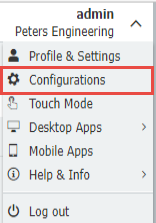
Note: If you cannot access the web client due to the error, you are able to access the configurations page by appending "/Settings/Hub" in the place of '/Platform/WebClient/' within your URL: https://yourorg.docuware.cloud/DocuWare/Settings/Hub.
2. Click on the User Management plugin, then select the affected user. Navigate to the Licenses tab and grant the user Workflow or Named licenses. Not sure which license to grant the user? Please see KBA-37536 for more information on the differences between Workflow and Named licenses.
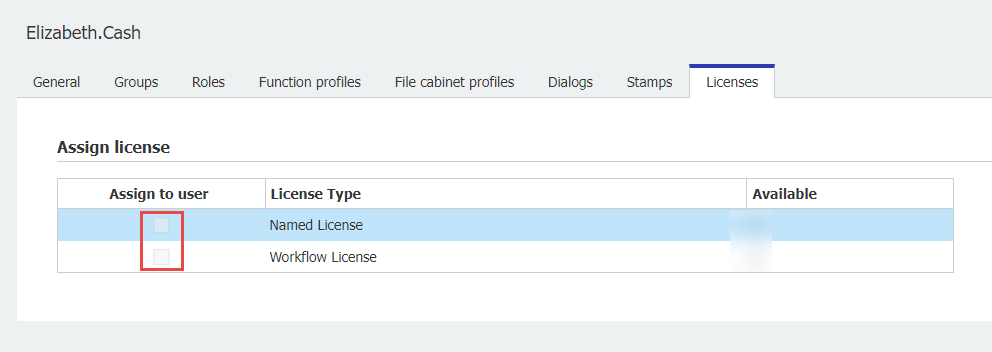
3. Once the affected users have been assigned a license, save your changes. Now, the affected user should be able to log in to DocuWare without error.
Note: If users were created via User Sync, Workflow User licenses will be assigned first (if applicable), followed by the Named User licenses.
Note: If users were created via User Sync, Workflow User licenses will be assigned first (if applicable), followed by the Named User licenses.
KBA is applicable to Cloud Organizations ONLY.