


Senario:
When running high-volume import jobs in DocuWare using Control/Metadata (dwControl) files, jobs occasionally stop prematurely.
Answer:
When performing large dwControls import jobs, best practice is to use dwControl files with an InsertFile statement. This ensures the data is matched based on the dwControl file’s content.
When using an insert file statement, only the control files are monitored, so the file name matching is not needed. This method works in contrast to relying on file name matching imports.
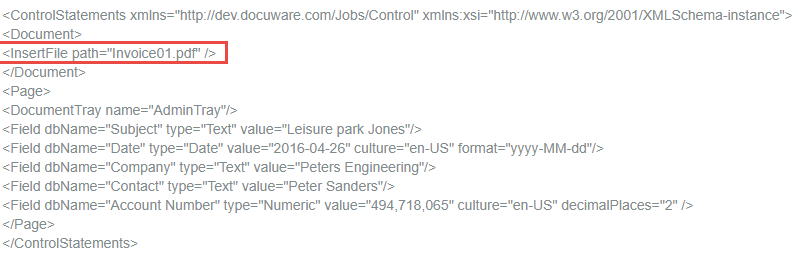
To define the PDF file name from an entry in the metadata file, include an "InsertFile path" command in the metadata file.
When performing large dwControls import jobs, best practice is to use dwControl files with an InsertFile statement. This ensures the data is matched based on the dwControl file’s content.
When using an insert file statement, only the control files are monitored, so the file name matching is not needed. This method works in contrast to relying on file name matching imports.
To define the PDF file name from an entry in the metadata file, include an "InsertFile path" command in the metadata file.
Example of identification by metadata:
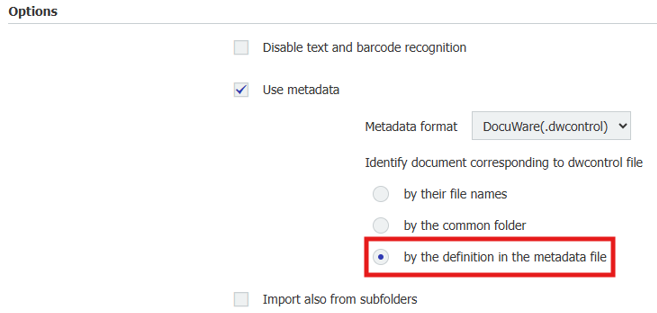
To use the insert file, the import configuration must also be adapted:
KBA is applicable for both Cloud and On-Prem organizations
It consistently loads about 30 files then just stops.
These files and sub are already there, been there a while because it stops and they sit there.
Nothing has touched them since April and they are not open anywhere else by anyone else because they are on drive C:\ of the workstation.
There have been no errors reported in the history file. Everyone of these is successful.
I run the data thru an XML cleaner before it writes the files so there are no errors.
Each file is alone with its own dwcontrol file that points to it.
At one time there was a way to set the number of imports that could happen at the same time and this seems to be that as a trigger to STOP instead of pause. Just a guess but I think this is coded wrong..
BY THE WAY.... I have found that the file name in the insert, needs to be surrounded by single quotes and not double quotes. Not sure why because all of your examples have double quotes but that is what works.
Examples are below..
The FILES are all in their own subfolders.
C:\DWIMPORTS\CEIMPORTS\CE01.10\00000103\1231.pdf
C:\DWIMPORTS\CEIMPORTS\CE01.10\00000103\00000103.dwcontrol
File look like this:
<Document>
<InsertFile path='1231.pdf'/>
</Document>
<Page>
<Field dbName="LF_PATH" type="MEMO" value="\DFI Financial\Currency Exchange\CE Folders\123"/>
<Field dbName="LF_NAME" type="Text" value="1231"/>
</Page>
</ControlStatements>